Internal Linking Strategy for Ranking Improvement
Quick Answer: Internal linking strategy for ranking improvement: how to pass relevance and authority can produce gains in weeks or months, but there is no…
Last updated: October 12, 2026
Quick Answer: Internal linking strategy for ranking improvement: how to pass relevance and authority can produce gains in weeks or months, but there is no guaranteed number; on many sites, the first improvements show up after fixing orphan pages, clarifying hubs, and linking priority pages from stronger sources. Internal linking is one of the cleanest ways to help a page rank, but only if I treat it as a relevance map, not a pile of blue links. The job is to tell search engines which pages matter, what each page is about, and how authority should flow across the site.
Key takeaways
- Internal links work best when they connect pages by topic, not by habit.
- The strongest links usually come from pages that already attract visits, links, or strong engagement.
- Anchor text should describe the destination clearly enough that a reader can predict what comes next.
- One weak hub page can drag a cluster down if it sits in the wrong place or links too broadly.
- Internal linking gains often start with fixing orphan pages, tightening site architecture, and linking from high-value pages to priority pages.
- Internal linking is not a substitute for thin content; it only helps good pages get understood and discovered faster.
What internal linking is actually for
Internal linking strategy for ranking improvement: how to pass relevance and authority is for moving both relevance and authority through a site in a way that a crawler can follow and a reader can understand. If I had to reduce the whole strategy to one sentence, it would be this: the right page should be only a few clicks away from the pages that prove it matters.
That sounds simple, but a generic article often gets this wrong in two ways. First, it treats internal links as a technical cleanup task, when they are really an editorial decision; if you are unsure how to apply that judgment, consult a professional and review Google’s guidance on how links help discovery and crawling: https://developers.google.com/search/docs/crawling-indexing/links-crawlable. Second, it talks about “passing link juice” without asking whether the linked pages belong to the same topic cluster. A link from a high-authority page about running shoes to a page about marathon hydration makes sense. A link to a page about tax software does not, even if both URLs live on the same domain.
I prefer to think about internal links in three jobs:
- Discovery — making sure crawlers can reach the page.
- Context — making sure the link text and surrounding copy tell the crawler what the page is about.
- Priority — making sure the page receives enough internal attention to look important.
The first job is basic. The second and third are where rankings usually move. A page buried behind six layers of navigation and linked only with “read more” gives search engines very little reason to associate it with a target query. A page linked from a relevant hub, an article that already earns traffic, and a category page with clear topical framing gets a much better signal.
This is why I would not use internal linking as a generic “add more links everywhere” tactic. That approach can blur topical focus and make every page look interchangeable. It is especially bad for sites with large archives, where random cross-linking turns a clean structure into a maze.
How do internal links pass relevance and authority?
Internal links pass relevance and authority by combining placement, anchor text, and source page strength. Search engines use the link as a path, but they also read the words around it and the topic of the page that contains it.
The strongest internal links usually come from pages that already have some of the following:
- more external links than average
- strong organic traffic
- clear topical alignment with the target page
- a central position in the site architecture
A page with no visibility can still link to another page, but it has little authority to pass. That is why I would start with the pages that already perform. In most sites, those are the homepage, main category pages, cornerstone guides, and a handful of older articles that rank or attract links.
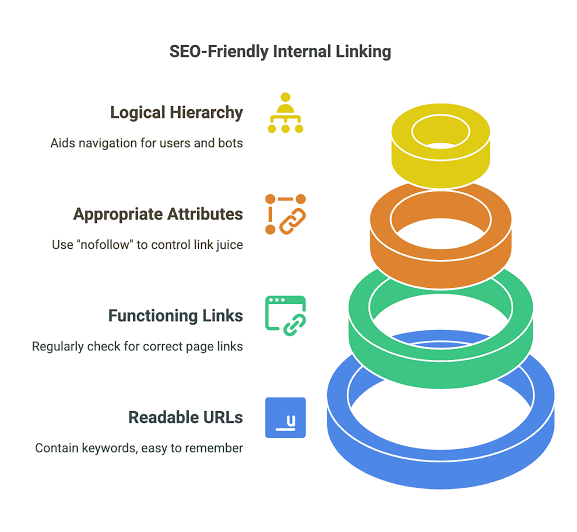
Anchor text matters because it narrows the meaning of the link. “Learn more” tells search engines almost nothing. “Internal linking strategy for e-commerce category pages” is much more useful. I do not recommend forcing exact-match anchor text into every link, because that quickly looks unnatural and repetitive. I prefer a pattern of descriptive but varied anchors that still point in the same topical direction.
Context matters in the article body too. A link buried in a footer or a sidebar is weaker as a relevance signal than a link in the body of a page that discusses the same subject. That does not mean navigational links are useless; it means they do a different job. Body links usually carry the clearest topical clue.
A useful test is simple: if I removed the URL from the page, would the remaining sentence still tell the reader exactly what page they are about to open? If not, the anchor is probably too vague.
This is where many articles oversimplify the topic. They talk as if every internal link has equal value. It does not. A link from a page that is already central to the site’s subject is more useful than a link from a weak, off-topic page with little organic visibility. The structure matters as much as the link count.
Build topic clusters, not link piles
A good internal linking strategy starts with topic clusters, not with a spreadsheet of URLs. The cluster model works because it reflects how real readers move through a subject: from broad explanation to specific questions, then back to a central page that frames the topic.
The structure I usually recommend is:
- One hub page for the main topic
- Several support pages for subtopics and intent variations
- Cross-links between closely related support pages only when they add genuine value
- Clear links back to the hub page from each support page
If the site sells software, the hub might be a “complete guide” page, and the support pages might cover setup, integrations, pricing, troubleshooting, and use cases. If the site publishes editorial content, the hub might be a category page or a long guide, with shorter articles feeding into it.
The mistake I see most often is giving every page equal status. That sounds fair, but SEO is not a democracy. Not every page deserves the same number of internal links or the same place in the architecture. I would rather have one strong hub supported by eight tightly related pages than twenty scattered pages all pointing vaguely at each other.
A cluster also helps with cannibalization. If multiple pages target near-identical intents, internal linking can reinforce the best page instead of letting all of them compete blindly, although it is not a guarantee and works best when the content itself is clearly differentiated. That means I need to decide which page is the primary answer and which pages are supporting detail. The internal links should reflect that decision.
The practical rule is this: link upward to the hub, laterally only when the relationship is tight, and downward only when the destination adds the next logical step. If a link does not help the reader advance, it probably does not help ranking either.
This is also where site architecture and internal linking meet. A flatter structure is not always best. A small site may work fine with three or four clicks to reach most pages, but a larger site needs hierarchy or the crawl path gets messy. I would not flatten everything just to make it look simple.
What should get the strongest internal links?
The pages that should get the strongest internal links are the pages that matter most to the site’s business and the pages that already have the best chance of ranking. That usually means priority money pages, cornerstone content, and the best-performing informational pages that sit near a conversion path.
If I were auditing a site, I would rank pages into four buckets:
- Primary pages — the pages I want to rank or convert most.
- Support pages — pages that explain subtopics and feed authority upward.
- Utility pages — contact, about, policy, and help pages.
- Orphan or weak pages — pages with little internal support and little reason to rank.
Primary pages should receive links from the most relevant and authoritative internal sources. Support pages should be linked from the hub and from closely related content. Utility pages should not consume prime internal link equity unless they play an actual search role. Orphan pages should either be integrated into a cluster or removed if they serve no clear purpose.
I would be careful with overlinking the homepage to everything. The homepage often has the strongest authority, so it is tempting to use it as a dumping ground for every important URL. That can work for a small site, but it becomes noisy fast. The homepage should point to the main sections, not carry the full burden of site discovery.
Another mistake is burying important pages behind click depth. If a page is important, I want it near the top of the internal hierarchy and linked from at least one strong, relevant page. A page that only appears in an XML sitemap is not really supported internally. It may be crawled, but it is not clearly prioritized.
I also pay attention to link prominence. A main-body link usually deserves more weight than a small footer mention. A link near the top of a page often gets more user attention than one at the bottom. Search engines are not human eyes, but placement still correlates with importance.
What goes wrong in internal linking strategy?
Internal linking goes wrong when a site confuses quantity with structure, and that usually costs relevance, crawl efficiency, or both. The damage is often subtle, which is why it can sit unnoticed for months.
The most common failure is vague anchor text. If a site uses “click here,” “read more,” or “this article” across dozens of pages, it loses topical precision. Another failure is forced linking: pages are linked because they exist, not because they belong together. That makes the site feel noisy to readers and muddy to crawlers.
A third problem is authority dilution. If every new article links out to ten other pages, none of them receive much reinforcement. The site starts to look busy but not organized. A page with three strong, relevant internal links often has more value than a page with twenty scattered ones.
A fourth issue is broken hierarchy. I see this when a category page links down to supporting articles, but those articles never link back to the category page or the hub. The result is an inverted structure: the cluster has no center, so authority leaks sideways instead of building upward.
The cost is not always immediate rankings loss. Sometimes the first sign is slower indexing, weaker keyword association, or a page that gets impressions for the wrong terms. That is a clue that relevance signals are fragmented.
There is a trade-off here, and I would state it plainly: a more disciplined internal linking structure can feel less “connected” at first because not every page links to every related page. That restraint is the point. A site that links everywhere often ends up saying nothing clearly.
This strategy is not for sites that need to preserve every page equally. If a site has thin archive content, duplicated topics, or dozens of pages with no search purpose, internal linking will not rescue the whole structure. Those sites need pruning, consolidation, or rewriting first.
A practical internal linking workflow that actually holds up
A practical internal linking workflow starts with one list of pages and ends with a clear map of who supports whom. I would do it in this order:
- Identify the pages that matter most. Pick the pages that should rank or convert.
- Group pages by intent and topic. Separate broad educational pages, commercial pages, and support content.
- Find the strongest source pages. These are the pages with traffic, links, or strong engagement.
- Add links from strong sources to priority pages. Use descriptive anchors that fit the sentence.
- Add links from support pages back to the hub. Reinforce the cluster center.
- Remove or reduce weak, random links. Clean up anything that does not help readers move forward.
I would also inspect internal links in templates, because one template mistake can affect hundreds of URLs. A related-post block, category module, or sidebar can quietly overlink weak pages or underlink the important ones. That is especially true on large CMS-driven sites.
There is one technical habit I like because it keeps the strategy honest: I separate navigation links from editorial links. Navigation links help users move through the site. Editorial links explain the topic. Both matter, but they should not be confused. If all relevance depends on the menu, the body content is under-optimized.
For audit work, I would use crawler data from tools such as Screaming Frog, Sitebulb, or similar site-crawling software, then compare that to Search Console data and the site’s own analytics. I would look for pages with too few internal links, pages sitting too deep, and pages receiving links from unrelated sections. That combination usually reveals the real problem faster than guesswork.
The goal is not to create the maximum number of links. The goal is to make the site easier to understand, easier to crawl, and easier to trust as a topical authority.
How do I know if the internal linking strategy is working?
I know an internal linking strategy is working when the priority pages become easier to find, easier to understand, and easier to rank for the terms they are meant to own. I would look for changes in crawl paths, index coverage, query relevance, and page-to-page movement before I look for vanity metrics.
The earliest signs are usually structural, not dramatic:
- important pages get crawled more consistently
- orphan pages are reduced or removed
- hub pages start receiving stronger internal support
- search impressions shift toward the intended topic
- related pages reinforce each other instead of competing
A mistake I would avoid is expecting one internal link update to produce instant ranking movement. Internal linking can improve the conditions for ranking, but it is not a magic switch. If a page is weak, thin, or mismatched to intent, stronger internal links will not fix the underlying content problem.
The most useful audit question is this: if I had to delete half the internal links on the site, which ones would I keep because they are doing real work? Those are usually the links that connect hubs to supporting pages, commercial pages to relevant educational content, and high-visibility pages to the URLs the site most wants to rank.
A final judgment call: internal linking is one of the best low-cost ways to improve rankings on a site that already has decent content. It is a poor substitute for content quality, but a strong amplifier of it. That is why I would treat it as part editorial, part architecture, and part prioritization.
FAQ
How many internal links should a page have?
There is no universal number, but I would keep links purposeful and readable rather than chasing a quota. A long page can carry more links than a short one if each link earns its place.
Drafted with AI; not yet reviewed by a person.