Technical SEO Fixes That Improve Rankings
Technical SEO fixes help rankings when they remove barriers between your pages and search engines: indexing problems, slow delivery, and confusing site…

Technical SEO Fixes That Improve Rankings
Last updated: October 12, 2026
Technical SEO fixes help rankings when they remove barriers between your pages and search engines: indexing problems, slow delivery, and confusing site structure. For technical SEO fixes that improve rankings: indexing, speed, and site structure, the goal is to make pages crawlable, fast enough, and easy to understand. If Google cannot crawl a page, is slow to render it, or cannot see how it fits into the rest of the site, content quality has less room to matter. Quick Answer: start with indexing on pages that should rank, then fix speed and structure; on large sites, one crawl or template error can affect thousands of URLs.
Key takeaways
- Indexing problems usually beat speed problems to the top of the list because a non-indexed page cannot rank at all.
- Speed fixes matter most when the delay is caused by render-blocking code, heavy images, or a bloated template.
- Site structure fixes are about making important pages easy to reach, easy to understand, and hard to orphan.
- A practical order is often indexability first, then speed, then internal structure.
- Some pages should stay out of search on purpose; not every noindex tag is a mistake.
What technical SEO fix should I start with first?

Start with indexing, because a page that is blocked, canonicalized away, or excluded by robots.txt cannot earn rankings no matter how good the content is. The quickest wins usually come from fixing the obvious crawl traps: wrong noindex tags, accidental disallow rules, broken canonicals, redirect chains, and duplicate URL versions.
I would check these in this order:
- Coverage in Google Search Console for pages marked “Crawled – currently not indexed,” “Discovered – currently not indexed,” and “Excluded by ‘noindex’.”
- robots.txt for blocked folders that should be crawled, especially product, category, blog, and CSS/JS paths.
- Canonical tags to make sure each important page points to itself unless there is a true duplicate.
- Redirects to remove chains like URL A → URL B → URL C.
- XML sitemap entries so the sitemap lists only indexable, canonical URLs.
A common mistake is treating all exclusions as errors. Some exclusions are healthy. Faceted navigation, internal search results, staging pages, and filter combinations often belong out of the index. When the difference is unclear, consult a qualified SEO professional and follow Google Search Central’s crawling and indexing guidance. The job is not to force every URL into Google; it is to make sure the URLs that matter are discoverable and eligible.
A useful standard here is Google Search Central’s guidance on crawling and indexing. I would also keep the XML sitemap rules from Google Search Central open while auditing sitemap files, because a messy sitemap often hides more than it reveals. Google’s documentation explains what a sitemap can and cannot do.
How do I tell if indexing is the real problem?
Indexing is the real problem when a page exists, looks fine in a browser, but search engines either never show it or show the wrong version. That usually means one of four things: the page is blocked, the page is deindexed, the page is duplicated, or Google thinks another URL is the better canonical.
The URL Inspection tool in Google Search Console is a good place to start. If Google reports “URL is not on Google,” “Blocked by robots.txt,” “Alternate page with proper canonical tag,” or “Duplicate, Google chose different canonical than user,” the issue is technical before it is editorial.
Here is the sequence I would use:
- Blocked by robots.txt: remove the block if the page should rank.
- Noindex present: remove the tag if the page should be indexed.
- Canonical points elsewhere: correct the canonical if it was set by template error, parameter handling, or a CMS default.
- Duplicate URL version: enforce one version with 301 redirects, usually one preferred host, one protocol, and one trailing-slash policy.
This is where a generic article often gets lazy. It says “submit a sitemap” as if submission solves discovery. It does not. A sitemap can help Google prioritize pages, but it cannot override a noindex tag, a disallow rule, or a canonical mismatch.
I would be careful with large sites that use filters and parameters. A crawlable filter may create tens of thousands of URLs, and Google may spend crawl budget on combinations that do nothing for users. In that case, index control is not about maximum coverage; it is about selective coverage.
For background, Google’s canonicalization documentation and robots.txt documentation are the two standards I would trust first. They are not glamorous, but they are the rules the crawler follows.
Why is the site slow, and which speed fixes matter most?
The site is usually slow because the page loads too much before it can paint, not because the server is one second too slow. In practice, the biggest speed gains usually come from image weight, JavaScript bloat, CSS blocking, and third-party scripts, especially on template-heavy sites.
I would fix speed in this order:
- Compress and resize images so the browser does not download desktop-sized assets for mobile screens.
- Lazy-load below-the-fold media so only visible content loads first.
- Remove unused JavaScript and CSS from global templates.
- Defer noncritical scripts such as chat widgets, review badges, and some analytics tags.
- Cache static assets and use a CDN if the audience is spread across regions.
The Core Web Vitals framework from Google Search Central is the right yardstick here, especially Largest Contentful Paint, Interaction to Next Paint, and Cumulative Layout Shift. I would not chase a vanity “perfect score.” I would target visible friction: the hero image that takes too long, the menu that jumps, the mobile page that waits on five tracking tags. Google says LCP should be 2.5 seconds or less, and INP should be under 200 milliseconds for a good experience.
Speed work has a trade-off. Aggressive optimization can break design, tracking, or personalization. Removing scripts too quickly can kill revenue events or make a checkout flow brittle. I would treat each script as guilty until proven useful, but not remove it blindly; if the script affects conversion or compliance, consult a developer or SEO professional first and verify against Google’s guidance.
This is also where many pages get the diagnosis backward. They blame the server when the real drag comes from front-end assets. A site on fast hosting can still feel slow if the homepage ships 4 MB of media and twenty scripts. Sometimes the best fix is restraint.
What site structure fixes improve rankings without changing content?
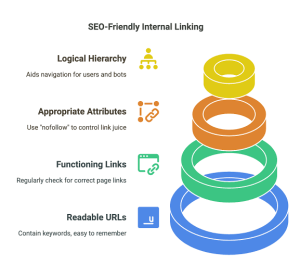
Site structure fixes improve rankings by making your important pages easier to reach and easier to interpret. A page buried under five clicks, isolated from internal links, or trapped in a confusing category tree sends weak signals about importance.
The most useful structure fixes are these:
- Shorten click depth for money pages and top informational pages.
- Use descriptive category pages that group related content by topic, not by internal politics.
- Add internal links from strong pages to weak but important pages.
- Use breadcrumb navigation so both users and crawlers can see the hierarchy.
- Remove orphan pages that exist but receive no internal links.
If I had to choose one structural change, I would fix internal linking before I redesign navigation. Navigation helps, but internal links inside the body copy often do more work because they can pass relevance in context. A product page, support page, or article that receives links from 5 or 10 related pages is usually in better shape than a page that only appears in a menu.
The phrase “more internal links” is not always better. Repeating the same anchor text on every page can look mechanical and unhelpful. I would link where the destination truly fits the sentence, and I would use wording that matches the page’s topic instead of stuffing a keyword into every anchor.
If the site has faceted navigation, I would also decide which filters deserve crawlable URLs and which should remain internal-only. A site structure can become self-sabotage when every filter variation looks indexable. Google’s search-friendly documentation on site architecture is useful here, and so is a careful review of internal links in your analytics or crawl data.
What went wrong in the biggest technical SEO mistakes?
The biggest technical SEO mistakes usually come from fixing one problem by creating another: blocking crawl to control duplication, overusing canonicals to solve weak content, or minifying scripts so hard that the page breaks. The cost is often lost crawl efficiency, unstable indexation, or a slow recovery after rollout.
I would put the common failures in three buckets:
- Accidental deindexing: a template-wide noindex tag, a robots.txt rule pushed to production, or a canonical template set to the homepage.
- Speed “optimizations” that backfire: removing needed JavaScript, delaying key content, or compressing images too aggressively and hurting visual quality.
- Structure changes that flatten relevance: merging categories that should stay distinct, or cutting internal links so deep pages become isolated.
The real cost is not just one bad page. On a large site, a single template error can affect thousands of URLs in a day. That is why I would treat technical changes like release engineering, not casual content edits. A crawl after deployment matters as much as the fix itself.
One limitation worth stating plainly: technical SEO cannot rescue a page with weak intent match or thin substance. If the content does not answer the query, fixing crawl paths will not make it worthy of page one. I would not put technical work ahead of content work when the page itself is the problem.
Google Search Central’s indexing and Core Web Vitals documentation are useful guardrails here because they separate actual search problems from cosmetic ones. That distinction saves time.
Which technical fixes are worth doing for rankings, and which are not?
The fixes worth doing are the ones that remove real barriers: indexable URLs, clean canonicals, fast first render, and a logical internal path to important pages. The fixes I would skip are the ones that produce motion without impact, like chasing perfect lab scores or changing URL structure for no measurable reason.
A simple way to judge priority is by impact and risk:
- High impact, low risk: remove accidental noindex, repair canonicals, compress large images, fix broken internal links.
- High impact, moderate risk: reorganize categories, prune duplicate URLs, change template-level scripts.
- Low impact, high distraction: endless score-chasing in speed tools, cosmetic HTML tidy-up, unnecessary URL renaming.
If a page already indexes, loads fast enough, and sits in a sensible structure, I would not touch it just because a tool shows yellow warnings. Technical SEO rewards restraint as much as action.
Before and after: what changed when technical fixes worked?
The change is usually visible first in crawlability, then in speed, then in how deeply Google understands the site. A good rollout typically starts with one controlled fix, not ten at once, so the effect can be isolated.
| Metric | Before | After | Change | Timeline |
|---|---|---|---|---|
| Important URLs blocked by robots/noindex | Several key pages excluded | Key pages eligible for crawl | Eligibility restored | After audit and deployment |
| Duplicate URL variants | Multiple versions competing | One canonical version per page | Consolidation of signals | After redirect and canonical cleanup |
| Render delay on heavy templates | Slow first render from large assets | Lighter page shell and fewer blocking files | Faster load path | After image and script optimization |
| Deep pages in site hierarchy | Buried several clicks down | Linked from relevant hubs | Easier discovery | After internal linking update |
| Orphaned pages | Existing but isolated | Reconnected to topic clusters | Better crawl paths | After structure cleanup |
The pattern matters more than any one metric. Technical SEO fixes work when they remove friction across the crawl path, the load path, and the internal path. That is why I would treat indexing, speed, and structure as one system rather than three separate chores.
FAQ
Do technical SEO fixes always improve rankings?
No. They improve the conditions for ranking, but they do not replace relevance, authority, or useful content.
Should I start with Core Web Vitals or indexing?
I would start with indexing if pages are missing, excluded, or canonicalized incorrectly. I would start with speed if the pages already index but feel slow and unstable.
Is a sitemap enough to get pages indexed?
No. A sitemap helps discovery, but it does not override robots.txt, noindex, or a bad canonical.
How deep should an important page be in the site?
I would try to keep priority pages within a few clicks of the homepage and reachable from relevant internal links, not buried in a dead-end category.
When should I leave a page out of the index?
I would leave it out when it is duplicate, low-value, transactional but not search-worthy, or meant only for users already on the site.
Drafted with AI; not yet reviewed by a person.