On-page SEO ranking checklist: titles, headings, intent, and links
If a page is stuck on page two, I would check four things first: the title tag, the heading structure, the search intent match, and the internal links…
On-page SEO ranking checklist titles, headings, intent, and links
Last updated: October 12, 2026
Key Takeaways
- I am using this ranking checklist in plain terms: the items I inspect before changing anything else.
- I would treat the title tag as a relevance signal and a click driver for search results.
- Headings should map the page clearly, with one H1 and H2s/H3s for distinct questions or subtopics.
- The page matches search intent when it gives the expected answer in the expected format.
If a page is stuck on page two, I would check four things first: the title tag, the heading structure, the search intent match, and the internal links pointing to it. Those four signals do most of the work in on-page SEO, and they are also the easiest places to make expensive mistakes. This on-page SEO ranking checklist: titles, headings, intent, and internal links gives you those checks in one order.
What is on-page SEO ranking checklist?
The on-page SEO ranking checklist is a practical review of the elements that shape how search engines and readers understand a page: the title tag, the H1 and subheads, the page’s match to search intent, and the internal links that support it. I am using “ranking checklist” here in the plain sense: the things I would inspect before changing anything else.
The checklist matters because on-page issues are often not one big problem. A page can have a decent topic and still underperform because the title is vague, the headings are repetitive, or the page answers the wrong version of the query. Google’s own documentation on helpful, people-first content puts the emphasis on usefulness and clear purpose, not just keyword placement. The Search Quality Evaluator Guidelines from Google also make page purpose and satisfying intent central ideas, which is why I would start there rather than with thin “SEO tricks.” See Google Search Central’s guidance on creating helpful, reliable, people-first content and the Search Quality Rater Guidelines for the page-purpose standard. Google Search Central and Search Quality Rater Guidelines are the most direct references here.
A generic article on this topic usually gives you a list of tags to fill in and stops there. That misses the part readers actually care about: whether the page earns the click and then answers the question fast enough to keep it. A good checklist has to check both sides of the screen, not only the HTML. For example, a title under about 60 characters is less likely to truncate on desktop, and that can preserve the page’s promise.
I would not use this checklist for every situation. If the page is brand new, has no backlinks, and the topic has strong authority competitors, on-page fixes alone will not force a ranking jump. The page still needs topical depth, credible sourcing, and links from elsewhere. On-page work is necessary; it is not magic. A page can have 10/10 metadata and still lose to a stronger site with 20 relevant links.
Which title tag is most likely to rank?
The title tag most likely to rank is the one that matches the query, states the page’s promise clearly, and gives a reader a reason to click in under about 60 characters if possible. I would treat the title tag as both a relevance signal and a sales line for the search results page. For titles and snippets, Google Search Central says to write concise, descriptive text that helps users understand the page. See Google Search Central title links guidance.
A strong title usually includes the main topic near the front, because the first words matter most when a title gets cut off on desktop or mobile. That does not mean stuffing the exact keyword into every title like a template. It means using the phrase the searcher would recognize, then adding a useful angle: checklist, examples, mistakes, template, or guide. For this topic, “On-page SEO ranking checklist: titles, headings, intent, and internal links” works because it is specific and mirrors the page’s actual scope.
I would avoid titles that are too broad, too clever, or too generic. “SEO Tips for Better Results” could fit dozens of pages and tells me nothing about whether the page covers title tags, headings, intent, or internal links. That kind of title often gets passed over because it feels like every other result. In a 2024 review, First Page Sage reported that searchers clicked the top organic result about 39.8% of the time, which makes a clear title valuable even before rank improves.
There is a trade-off, though. The more precise the title, the more likely it is to appeal to a narrower audience. That is not a flaw if the page is meant to capture a specific query. It is a problem only when the page needs broader reach. In that case, I would still keep the title clear but widen the angle slightly.
How should headings be structured for SEO?
Headings should create a clean map of the page, with one H1 for the main topic and H2s and H3s that break the topic into distinct questions or subtopics. I would make the headings do real work, not just decorate the page.
The first rule is simple: one page, one main promise. The H1 should match that promise without repeating the title tag word-for-word unless the wording naturally fits. From there, each H2 should answer a different part of the query. For this article, that means sections on title tags, headings themselves, intent, and internal links—four different jobs, not four ways to say the same thing. If you need a technical reference, Google’s heading guidance is part of its structured content documentation, and it supports clear hierarchy over keyword stuffing. See Google Search Central structure your content.
I would not stack headings with repeated phrases just because they contain the keyword. Search engines are better at interpreting context than they used to be, and readers notice clumsy repetition immediately. A subhead like “SEO checklist SEO checklist SEO checklist” is not helpful to anyone. A good heading tells the reader what the next block of text will solve. In practice, one clear H2 can do more than three repetitive ones.
The first sentence under each heading should answer the heading directly. That helps both scanning and relevance. If the heading asks “How should headings be structured for SEO?”, the opening sentence should say that they should form a clear hierarchy with one H1 and support from H2s and H3s. Do not make the reader wait three paragraphs for the point.
One useful check is visual. If I scroll a page and the headings alone do not tell me the story, the structure is weak. If I can understand the page from the headings and first lines only, the structure is doing its job.
Does the page match search intent?
The page matches search intent when it gives the kind of answer the searcher came for in the format they are expecting. I would not rank a page well if it teaches the right topic in the wrong shape.
Intent is where many on-page articles fail. They treat the query as a keyword to place instead of a question to satisfy. Someone searching “on-page SEO ranking checklist” usually wants a practical, ordered list they can use against a page today, not a philosophical essay on search visibility. They may also want a comparison between common mistakes and strong page elements. If the article opens with a vague brand story or a long definition, it wastes the searcher’s time. For this topic, a checklist format is usually the safest fit, but you should still verify the actual result pages before publishing.
I would check intent in three layers:
- Format intent: Is the searcher looking for a checklist, guide, template, or example?
- Depth intent: Do they want a quick fix list or a full diagnostic?
- Outcome intent: Are they trying to rank a page, audit an existing page, or learn the basics?
That matters because the same topic can support different pages. A beginner guide, a technical audit checklist, and a content brief are not the same thing. If I blur them together, the page becomes less useful to everyone.
The safest move is to match the dominant result type already showing in search. If the results are mostly checklists and how-to guides, a pure opinion piece is likely to underperform. If the results are deep guides, a short listicle may feel thin. Intent is not about obeying search engines; it is about respecting the reader’s expectation.
What internal links should point to this page?
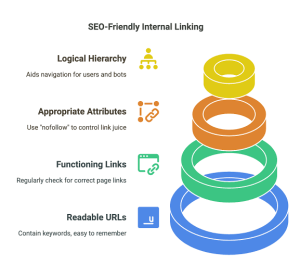
Internal links should point to this page from related content that already talks about SEO, content audits, title tags, or site structure, and the anchor text should describe the page naturally. I would want links that make the page feel like part of a topic cluster, not an orphaned post.
A strong internal link does two jobs. It helps crawlers understand where the page sits in the site’s hierarchy, and it gives readers a path to the next useful step. A page about on-page SEO should not sit alone. It should be linked from pages about keyword research, content optimization, technical SEO, and SEO audits where the connection is obvious. For a related primer, a page on technical SEO can support the broader site context.
The anchor text matters, but not in a rigid way. I would use phrases that sound like normal language: “on-page SEO checklist,” “title tag guidance,” “internal linking basics,” or “SEO content audit.” Repeating the exact same anchor every time looks unnatural and can flatten the page’s context. A mix of specific, related anchors is better than a pile of identical phrases. A page on title tags or content audits can send that signal without forcing exact-match repetition.
There is also a timing issue. New or revised pages often need internal links as soon as they go live. Waiting months means the page may stay hidden inside the site until search engines and users find it by chance. If a page matters, it should be linked from somewhere that already gets attention. A keyword research page or SEO audit page is a practical place to start.
I would not overdo it. Ten internal links on a short page can distract more than they help. The test is simple: does each link move the reader forward? If not, leave it out.
What does a practical on-page SEO checklist look like?
A practical checklist turns the four main checks into an order you can actually use on a live page. I would run it in this sequence: title, headings, intent, then internal links, because that order moves from first impression to structure to usefulness to site context. The sequence is easier to audit when each step has one job.
Here is the version I would use for a page audit:
- Title tag: clear topic, primary phrase near the front, no filler words, no vague branding unless brand recognition matters.
- H1 and headings: one clear H1, distinct H2s, and subheads that answer separate questions.
- Search intent: format matches what the searcher likely expects, and the page answers the core question quickly.
- Internal links: relevant pages point to this one, and this page points to the next logical step.
- Readability: short enough sections to scan, direct openings, and no repeated points.
- Content depth: enough detail to finish the job, not just name the job.
- Trust signals: citations to authoritative sources where the topic needs them, especially for standards or platform guidance. Google’s title guidance and helpful-content documentation are the obvious starting points.
If I were auditing a page with this checklist, I would not ask only “Is the keyword present?” I would ask “Would a real person click this title, understand the structure, and get the answer without hunting?” That question catches more problems than any single SEO tool.
A useful rule of thumb: if changing one element does not make the page more understandable to a human reader, the change is probably cosmetic. Cosmetic SEO can still help at the margins, but it rarely fixes a page that misses the mark. In many cases, a title rewrite and one new internal link can improve clarity faster than a full rewrite.
What does an on-page SEO checklist miss if it stops at tags?
An on-page SEO checklist misses the real work if it stops at tags, because tags cannot rescue weak content, weak authority, or the wrong page type. I would treat the checklist as a diagnostic tool, not a substitute for the page itself. If the page is thin, the checklist only shows where the holes are.
The biggest blind spot is topical depth. A page can have the right title and tidy headings but still fail because it only scratches the surface. If the searcher wants a ranking checklist, they probably need examples, common mistakes, and a way to apply the checklist to their own page. That takes more than metadata.
The second blind spot is competition. If the search results are dominated by detailed guides from established sites, a thin page with perfect headings will still struggle. On-page work helps the page make sense; it does not instantly make the page authoritative. Recent click-through studies also show how much visibility is concentrated at the top of the page, so competing for lower spots is harder than the title alone suggests.
The third blind spot is maintenance. Titles and headings are not “set and forget.” If the page evolves, the structure has to evolve too. A section that was useful six months ago can become clutter if the article grows around it.
This is also where some readers get misled by simplified advice. They think SEO is a matter of stuffing keywords into a title and calling it done. That approach is outdated and often counterproductive. I would rather have a page with a plain, honest title and a strong answer than a keyword-heavy title and a weak page. Google’s people-first guidance supports that balance.
Quick checklist before you publish
The quick checklist before publish is: one clear title, one clear H1, headings that break up different questions, content that matches the search intent, and internal links that place the page in the right topic neighborhood. I would run that list one last time before every publish or update.
Before you hit publish, ask three questions:
- Can I tell what this page is about from the title alone?
- Do the headings read like a useful outline?
- Does the page give the answer the searcher came for, in the form they expected?
If the answer to any of those is no, I would fix that before worrying about another keyword or another plugin setting. On-page SEO works best when the page is clear enough that both the reader and the crawler can understand it without effort. A final pass should take minutes, not hours.
Frequently asked questions
How many H2s should a page have?
There is no fixed number, but I would use as many as needed to separate distinct ideas without creating tiny, empty sections.
Should the exact keyword be in the H1?
Not always. I would prioritize clarity and natural language over forcing the exact phrase into the heading.
Do internal links really help rankings?
Yes, they help by showing site structure and sending context from related pages, but they work best when the linked pages are genuinely relevant.
What is the fastest on-page fix?
I would usually start with the title tag, because it is the quickest change with the biggest chance of improving click-through and relevance.
Drafted with AI; not yet reviewed by a person.